Corporate Banking

Account Services

Online Banking
- Online Banking Services
- BEA Macau Online
Looking for question about
BEA Macau Online is an innovative and integrated electronic banking service that allows you to access related accounts via the Internet.
With BEA Macau Online, you can check your accounts, manage your finances, and transfer funds anytime, anywhere.
If you are a personal account holder with The Bank of East Asia, Limited, Macau Branch ("The Branch" / "BEA Macau Branch"), you can open a BEA Macau Online account at BEA Macau Branch.
If you are a SupremeGold Account holder, you are automatically entitled to use the service.
Accessing BEA Macau Online via the Internet is simple and easy. Upon account opening, an initial personal identification number ("PIN") will be issued to you for first-time access via the Internet. Simply visit the website www.hkbea.com.mo and click "BEA Macau Online". Then enter your BEA Macau Online account number and PIN to access your BEA Macau Online account.
Apart from entering the account number and PIN, you are required to input a one-time password ("OTP") to login to BEA Macau Online as an additional form of identity authentication. The OTP will be sent to your registered mobile phone number via Short Message Service ("SMS").
If you have troubles receiving the related SMS during login, please visit BEA Macau Branch in person to verify or update your registered mobile number.
For your security, you are required to change your PIN when you access your account for the first time. In addition, you are advised to change your PIN from time to time for added protection.
After your first time log in, you are required to set up your username. Your username must consist of 8-30 alphanumeric characters and must combine at least 3 numbers (0-9) and 3 letters in upper or lower case (A-Z or a-z, case sensitive). Spaces and other characters/symbols will not be accepted.
We strongly recommend that you set a unique username which is different from those you use for other web services (e.g. email accounts or other internet banking accounts), to protect yourself from malicious attacks.
Once your username has been created, you can use your username or account number to log in to BEA Macau Online. Your BEA Macau Online username cannot be changed or cancelled. As a unique identifier, it must be different from that of any other user. Please visit the Branch if you want to amend your username.
Yes. If input of OTP is not correct or if OTP expired (only valid for 100 seconds), you need to login again with your BEA Macau Online account number and password, then a new OTP will be sent to your registered mobile phone number.
BEA Macau Online is provided free of charge.
The daily transaction limits are as follows:
Fund transfers between BEA accounts:
| Type of Fund Transfer | Transaction Limit (per account per day) |
|---|---|
| Fund transfer between SupremeGold sub-accounts (same currency) | No limit |
| Fund transfer between SupremeGold sub-accounts (different currencies) | Please refer below “Exchange limits for different currencies for fund transfer” table |
| Fund transfer to own related accounts or designated third party accounts registered with BEA Macau Online | For own related accounts (same currency): No limit For own related accounts (different currencies): Please refer below “Exchange limits for different currencies for fund transfer” table For designated third party accounts (with prior registration) (same currency): HK$50,000 or its equivalent For designated third party accounts (with prior registration) (different currencies): HK$50,000 or its equivalent OR The exchange limits as stated in below “Exchange limits for different currencies for fund transfer” table, whichever is lower |
| Fund transfer to non-registered account | Same currency: HK$15,000 or its equivalent Different currencies: HK$15,000 or its equivalent OR The exchange limits as stated in below “Exchange limits for different currencies for fund transfer” table, whichever is lower |
Other transaction limits:
| Transaction Type | Transaction Limit (per account per day) |
|---|---|
| Credit Card payment | HK$50,000 |
| Telegraphic transfer | HK$500,000 or its equivalent* |
| MOP/HKD time deposit placement | HK$5,000,000 or its equivalent |
| Foreign currency time deposit placement | HK$2,000,000 or its equivalent |
| Cashier’s Order / Demand Draft Application | HK$500,000 or its equivalent |
* Remittances in renminbi cannot exceed CNY80,000 per day.
Exchange limits for different currencies for fund transfer:
Deposit
| Currency | Per Transaction | Accumulate Limit Per Day |
|---|---|---|
| AUD | 50,000 | 150,000 |
| CAD | 50,000 | 150,000 |
| CHF | 50,000 | 150,000 |
| EUR | 30,000 | 90,000 |
| GBP | 30,000 | 90,000 |
| HKD | 300,000 | 1,000,000 |
| JPY | 10,000,000 | 30,000,000 |
| NZD | 50,000 | 150,000 |
| SGD | 10,000 | 30,000 |
| USD | 200,000 | 600,000 |
| CNY | 300,000 | 1,000,000 |
| Currency | Per Transaction | Accumulate Limit Per Day |
|---|---|---|
| AUD | 50,000 | 150,000 |
| CAD | 50,000 | 150,000 |
| CHF | 50,000 | 150,000 |
| EUR | 30,000 | 90,000 |
| GBP | 30,000 | 90,000 |
| HKD | 300,000 | 1,000,000 |
| JPY | 10,000,000 | 30,000,000 |
| NZD | 50,000 | 150,000 |
| SGD | 10,000 | 30,000 |
| USD | 200,000 | 600,000 |
| CNY | 300,000 | 1,000,000 |
The default transaction limit for high-risk transactions in BEA Macau Online is set as zero. You have to register the i-Token with verification function to adjust your preferred high-risk transaction limits.
High risk transactions include:
You can enjoy the following services via BEA Macau Online:
For more details, please refer to Section 3, Service Details.
All services appear in BEA Macau Online's main menu in a column bar located on the top of the screen. Simply click on the corresponding button to access the desired service.
The following account types can be registered under BEA Macau Online:
An account must be registered before it can be accessed via BEA Macau Online.
You can view the service hours of BEA Macau Online services and the types of registered accounts by clicking "Service Hours" at the bottom of the home page or call Online Banking Service Hotline on +853 8598 3688.
To provide the highest level of service quality, BEA Macau Online performs weekly system maintenance. BEA Macau Online, Mobile Banking and ATM card services are unavailable from 3:00 am to 6:00 am on Sundays and Mondays. For an updated maintenance schedule, please click here.
Please note that all times are expressed in Macau time.
Q3.1.1 What information can I obtain in the main page?
In the main page, you can view the username/account number you used to login and the time you last login. You can also see the account portfolio in the dashboard, the deposit overview and recent transactions, the upcoming scheduled instruction, the time deposit and loans portfolio.
Q3.1.2 What information can I obtain through "Account”
Under “Account”, you can enquire “Account Overview” and “Account Activity”. You can apply and view “E-Statement/E-Advice”. You can also apply paper statement.
Q3.1.3 What Information can I obtain through “Account Overview” and “Account Activity”?
Under "Account Overview", you can enquire about the current and available balances of all registered accounts. Under “Account Activity, you can enquire about the current day's transactions, a maximum of the latest 30 transactions up to the start of the previous business day, or the transaction history up to the past 12 months.
Q3.2.1 What is E-Statement/ E-Advice service?
E-Statement/E-Advice service provides you with a convenient way to view your account statements and transaction details in PDF format. Simply click “E-Statement/E-Advice Application” to apply for this service.
Q3.2.2 Do I need to pay for E-statement/E-advice?
No. This service is available free-of-charge.
Q3.2.3 What types of E-statement / E-advice can be viewed?
E-statement is available for deposit accounts and E-advice is available for loan products.
Q3.2.4 How long will the past e-statements be retained?
You can access and view e-statements for up to the past 2 years through BEA Macau Online.
Q3.2.5 Can I apply for the past bank statement?
Under “Statement Requisition”, you can apply the bank statement for up to the past 7 years. The bank statement will be mailed to your registered address. There will be charges imposed, please refer to the “Bank Charges” for details.
Q3.3.1 What does "Transfer" allow me to do?
Under “Transfer”, you can transfer funds from your accounts to other BEA Macau accounts with or without prior registration.
Q3.3.2 What should I do if I want to submit a transfer instruction?
After clicking "Transfers" in the menu, you can input the transaction details. Then, you can click "Confirm" to continue or click "Back" to input again. On the next screen, you can verify and confirm the transaction details by clicking "Submit".
Q3.3.3 What should I do if I want to submit a telegraphic transfer instruction?
After clicking "Transfers", you just need to fill in the required information, then choose “Transfer to other Banks”. Then, you can click "Confirm" to continue or click "Back" to input again. On the next screen, you can verify and confirm the transaction details by clicking "Submit".
Q3.3.4 What is the service charge for a telegraphic transfer?
For details on the service charges for telegraphic transfers, please visit the BEA Macau Branch’s official website at www.hkbea.com.mo and click "Bank Charges" located at the bottom left side of the screen.
Q3.3.5 How can I find out if my fund transfer / telegraphic transfer instruction has been successfully submitted?
If the transaction is accepted, the message "Transaction Completed" will be displayed onscreen along with a transaction reference number. If the transaction is declined, a rejection message will be displayed onscreen.
Q3.3.6 What does the “Add a payee” allow me to do?
You can add the transferee as a payee when you perform fund transfer / telegraphic transfer transaction. Next time, you can simply choose the payee from the “Registered Payee” list to proceed the payment.
Q3.3.7 Will there be any notification when I complete the below Instructions:
The Branch will notify you the above-mentioned instruction is accepted by sending an SMS and/or email to your registered mobile and/or your designated email address.
Q3.3.8 When will the amount be deducted after the telegraphic transfer instruction?
If your telegraphic transfer instruction is completed during service hours, the instruction will be executed and the related amount and charges will be debited from the withdrawal account on the same day. If your telegraphic transfer instruction is submitted after the cut-off time, the instruction will be executed on the following working day.
Q3.3.9 Can I execute telegraphic transfer instructions in different currencies?
Yes, you can. We offer the following currencies telegraphic transfer instructions:
MOP; HKD; CNY; USD; AUD; CAD; CHF; EUR; GBP; NZD; JPY
* The currency of the telegraphic transfer must be the same as the account to be debited.
Q3.3.10 What does the “Scheduled Instruction” allow me to do?
The “Scheduled Instruction” allows you to set up, check, edit, and delete records of scheduled transfers that have not been executed. Please note that schedule transfer transaction is only applicable to fund transfer of same currency.
Q3.3.11 If I made a scheduled instruction for a fund transfer, when will the amount be deducted from my withdrawal account?
The Branch will debit the amount from your designated account in the early morning (Macau time) of each scheduled working day.
Q3.3.12 Can I place a one-time or multiple-time scheduled instructions for fund transfers?
Yes, you can place a one-time scheduled instruction or multiple-time scheduled instructions according to any of the following frequencies:
Q3.3.13 If the fund transfer instruction is scheduled to be executed on a Saturday, Sunday, or Macau banking public holiday, when will it actually be executed?
If your instruction is scheduled to be executed on a Saturday, Sunday, or a Macau banking public holiday, it will be executed on the following working day.
Q3.3.14 If my account does not maintain sufficient funds, will the scheduled instruction be executed?
No, in the event that there are insufficient funds in the withdrawal account to complete a scheduled instruction, the Branch will not execute such instruction.
To ensure that the scheduled instruction will be executed in a timely manner, please make sure that there are sufficient funds for the transfer before the date of execution.
Q3.3.15 Can I edit or cancel a scheduled instruction for a fund transfer set up via BEA Macau Online if an error is detected?
Yes, you can edit or cancel your instruction before the Execution Date. A new scheduled instruction number will be automatically assigned when you confirm the amendment of the existing scheduled instruction. However, you cannot edit or cancel the instruction on the Execution Date.
Q3.3.16 How can I find out if my scheduled fund transfer was successful on the Execution Date?
If the transaction is successfully executed, the Branch will notify you by sending an email to your designated email address, or you can check your account activity via BEA Macau Online.
Q3.3.17 When will I receive an email reminder?
You will receive an email reminder under the following situations:
Q3.3.18 Will there be any notification when I complete the below scheduled instructions:
The Branch will notify you the above-mentioned instruction is accepted by sending an SMS and/or email to your registered mobile and/or your designated email address.
Q3.3.19 If I do not register an email address with the Branch, will I receive an email reminder?
You will not receive an email reminder if you do not register your email address with the Branch. Please visit the Branch to provide your email address.
Q3.3.20 Can I set scheduled instructions in a foreign currency?
Yes, but the currency of the scheduled fund transfer must be the same as the account to be debited.
Q3.3.21 How far into the future can I set the expiry date for a multiple-time scheduled instruction?
The expiry date of a scheduled instruction must be within two years from the set-up date.
Q3.3.22 What type of transactions can I set up for the scheduled instruction?
The scheduled instruction can be set up for transfer to other accounts maintain with BEA Macau Branch, telegraphic transfer, Cashier’s Order/Demand Draft application and credit card payment.
Q3.4.1 What does the “Cashier’s Order Application”/ “Demand Draft Application” function allow me to do?
Under “Cashier’s Order Application” / “Demand Draft Application” , you can apply for a cashier’s order/demand draft. The service charge will be deducted from the designated account.
Q3.4.2 How will I receive my Cashier’s Order?
You can choose to pick up the cashier’s order at BEA Macau Branch or to have it delivered by registered mail. If you choose to have your cashier’s order delivered by registered mail, it will be mailed to your correspondence address on record at the Bank, the postage will be debited from your designated account. If your Cashier’s Order application is submitted before 5pm, it can be collected at the Branch on the same day. If your application is submitted after the cut-off time, the instruction will be executed on the following working day. Please visit the Branch to pick up the Cashier's Order on the next day.
Q3.4.3 How will I receive my Demand Draft?
If your Demand Draft application is submitted before 2pm, the demand draft can be collected at the Branch on the same day. If your application is submitted after the cut-off time, the instruction will be executed on the following working day. Please visit the Branch to pick up the Demand Draft on the next day.
Q3.4.4 How can I find out if my application has been successfully submitted?
If the transaction is accepted, the message "Transaction Completed" will be displayed onscreen along with a transaction reference number. If the transaction is declined, a rejection message will be displayed onscreen.
Q3.4.5 Will there be any notification when I complete the application?
The Branch will notify you the above-mentioned instruction is accepted by sending an SMS and/or email to your registered mobile and/or your designated email address.
Q3.4.6 If I do not register an email address with the Branch, will I receive an email reminder?
You will not receive an email reminder if you do not register your email address with the Branch. Please visit the Branch to provide your email address.
Q3.5.1 What does the "Cheque Book Requisition" function allow me to do?
Under “Cheque Book Requisition”, you can request a new cheque book. The service charge will be debited from the designated account.
Q3.5.2 How will I receive my cheque book?
You can choose to pick up the cheque book at BEA Macau Branch or to have your cheque book delivered by registered mail. If you choose to have your cheque book delivered by registered mail, the cheque book will be mailed to your correspondence address on record at the Branch, the postage will be debited from your designated account.
Q3.5.3 How can I find out if my application has been successfully submitted?
If the transaction is accepted, the message "Transaction Completed" will be displayed onscreen along with a transaction reference number. If the transaction is declined, a rejection message will be displayed onscreen.
Q3.5.4 Will there be any notification when I complete the application?
The Branch will notify you the above-mentioned instruction is accepted by sending an SMS and/or email to your registered mobile and/or your designated email address.
Q3.5.5 If I do not register an email address with the Branch, will I receive an email reminder?
You will not receive an email reminder if you do not register your email address with the Branch. Please visit the Branch to provide your email address.
Q3.6.1 What does "Credit Card Payment" allow me to do?
Under “Credit Card Payment” you can settle the payment of credit cards issued by The Bank of East Asia, Limited in Hong Kong using Credit Card Payment service. Prior registration is not required.
Q3.6.2 What should I do if I want to give a payment instruction?
After clicking "Credit Card Payment" in the menu, you can input the transaction details. Then, you can click "Confirm" to continue or click "Back" to input again. On the next screen, you can verify and confirm the transaction details by clicking "Submit".
Q3.6.3 How can I find out if my payment instruction has been successfully submitted?
If the transaction is accepted, the message "Transaction Completed" will be displayed onscreen along with a transaction reference number. If the transaction is declined, a rejection message will be displayed onscreen.
Q3.6.4 Is Credit Card Payment a 24-hour service?
Credit Card Payment service is available Monday to Friday from 0:00 am to 5:00 pm and all day on Saturdays, Sundays and Macau banking holidays. Credit Card Payment transactions will be valued on the next working day if the transaction is completed on a Saturday, Sunday, or Macau banking holiday.
Please note that all hours are expressed in Macau time.
Q3.6.5 What does the “Add a payee” allow me to do?
You can add the credit card holder as a payee when you make the payment. Next time, you can simply choose the payee from the “Registered Payee” list to proceed the payment.
Q3.6.6 If I set up a scheduled instruction under Credit Card Payment, when will the amount be debited from my withdrawal account?
The Branch will debit the amount from your designated account in the early morning (Macau time) of each scheduled working day.
Q3.6.7 Can I place a one-time or multiple-time scheduled instruction for payment?
You can place a one-time scheduled instruction or a multiple-time scheduled instruction according to any of the following frequencies:
Q3.6.8 If the Credit Card payment instruction is scheduled to be executed on a Saturday, Sunday, or Macau bank public holiday, when will it be executed?
If your instruction is scheduled to be executed on a Saturday, Sunday, or Macau banking public holiday, it will be executed on the following working day.
Q3.6.9 If my account does not maintain sufficient funds, will the scheduled instruction be executed?
No, in the event that there are insufficient funds in the withdrawal account to complete a scheduled instruction, the Branch will not execute such instruction.
To ensure that the scheduled instruction will be executed in a timely manner, please make sure that there are sufficient funds for the transfer before the date of execution.
Q3.6.10 Can I edit or cancel a scheduled instruction for the credit card payment set up via BEA Macau Online if an error is detected?
Yes, you can edit or cancel your instruction before the Execution Date. A new scheduled instruction number will be automatically assigned when you confirm the amendment of the existing scheduled instruction. However, you cannot edit or cancel the instruction on the Execution Date.
Q3.6.11 How can I find out if my scheduled credit card payment was successful on the Execution Date?
If the transaction is successfully executed, the Branch will notify you by sending an email to your designated email address, or you can check your account activity via BEA Macau Online.
Q3.6.12 When will I receive an email reminder?
You will receive an email reminder under the following situations:
Q3.6.13 Will there be any notification when I complete the below scheduled instructions:
The Branch will notify you the above-mentioned instruction is accepted by sending an SMS and/or email to your registered mobile and/or your designated email address.
Q3.6.14 If I do not register an email address with the Branch, will I receive an email reminder?
You will not receive an email reminder if you do not register your email address with the Branch. Please visit the Branch to provide your email address.
Q3.6.15 How long is a multiple-time scheduled instruction valid?
A multiple-time scheduled instruction can last up to 2 years.
Q3.6.16 Can I use different currencies to settle credit card payments?
No, only Hong Kong dollars can be used to settle credit card payments.
Q3.7.1 What does the "Time Deposits" function allow me to do?
Under “Time Deposits”, you can enquire your time deposits, place and uplift a time deposit, and give deposit maturity instructions.
Q3.7.2 Where can I find my time deposit records?
Choose "Deposit Summary" to view records of all your time deposit accounts. You can also view the deposit records of each time deposit account.
For details of individual deposits, click the “Action” button.
Q3.7.3 What should I do if I want to submit a deposit placement?
Select "Placement", enter the transaction details and select the maturity instruction. Then, you can click "Confirm" to continue or click "Back" to input again. On the next screen, you can verify and confirm the transaction details by clicking "Submit".
Q3.7.4 What should I do if I want to submit a maturity instruction?
Select "Time Deposits" and choose the time deposit account. Click the “Action” button, and select the maturity instruction. Then, you can click "Confirm" to continue or click "Back" to input again. On the next screen, you may verify and confirm the transaction details by clicking "Submit".
Q3.7.5 What deposit types can I operate in the "Time Deposit" function?
Q3.7.6 How do I know whether my deposit placement, uplift, or maturity instruction has been successfully submitted?
If the instruction is accepted, the message "Transaction Completed" will be displayed onscreen along with a transaction reference number. If the instruction is declined, a rejection message will be displayed onscreen.
Q3.7.7 What kinds of maturity instructions can I choose?
You can choose the following types of instructions:
Q3.8.1 What information can I obtain through the "Rate Enquiries" function?
You can view the following information:
Q3.9.1 What information can I obtain through the "Cyberfund Centre" function?
Under “Cyberfund Centre”, you can view the portfolio of Unit Trust you hold, including fund name, holding unit balance and reference price. You can check “Redeem” for redemption of the unit trust.
Q3.10.1 What is the purpose for making "DSF Tax Refund or Other Payments Registration"?
By means of this function, you can register your account at BEA Macau Branch to receive the tax refund or other payments from Financial Services Bureau (DSF) via bank transfer.
Q3.10.2 What is the fee and procedures for the registration?
The registration is free of charge. You can simply complete and submit the form online to register.
Q3.10.3 Is the registration applicable to all types of account?
The registration is only applicable to personal bank accounts in MOP and account holder has to be aged 18 or above. Joint accounts cannot be registered.
Q3.10.4 Will there be any notification when I complete the registration?
Upon completion of the registration, an online message "Registration Completed" will be shown to confirm your successful registration. The Bank will not notify you again by sending a SMS and/or email.
Q3.11.1 What limit can I set up through the "Transaction Limit" function?
To set up the transaction limits, you are required to use i-Token for authentication. Under “Transaction Limit Setting”, you can set up the limit for fund transfers, telegraphic transfer, cashier’s order/demand draft application and credit card payment. For details of the transaction limit, please refer to Q1.6.
Q3.12.1 What services are provided through the "Loans" function?
You can view the summary of all loan records and the repayment history. You can also view the loan advice if you have applied “E-Advice” service.
Q3.13.1 What is two-factor authentication (2FA)?
Two-factor authentication (2FA) is an authentication scheme that increases online security by relying on a combination of two different factors, e.g. something you know (e.g. user ID and password) and something you have (e.g. a one-time password ("OTP") or activated i-token on your mobile device), in the verification of a user's identity.
Q3.13.2 Why is two-factor authentication needed for online banking transactions?
Although fraudsters may be able to illegally obtain your user ID or password, they cannot steal something you have in your physical possession, such as mobile phone, over the Internet.
Q3.13.3 What is a One-time Password ("OTP")?
An OTP is a password generated by us and sent to you for you to input as an additional form of identity authentication. You will need an OTP each time you login to BEA Macau Online and perform designated transactions through BEA Macau Online. Each OTP is used only once for a designated transaction and expires after 100 seconds.
Q3.13.4 How do I use the One-time Password ("OTP")?
When you login or perform a designated transaction through BEA Macau Online, an OTP will be sent to your registered mobile device. You must check the transactions details displayed in the SMS message and then input the OTP on the web page to complete the process before it expires.
Q3.13.5 When do I need to use a one-time password and answer the security question?
OTP is used in the following functions:
You need to use a one-time password and answer the security question when change your PIN.
Q3.13.6 Do I need to visit BEA Macau Branch for registration of using one-time password?
No, you can simply register your mobile phone number with the Branch and you will receive one-time password when you perform any transactions.
Q3.13.7 What should I do if I receive an SMS containing a one-time password on my mobile phone but am not performing any Internet banking transactions?
Please call online banking service hotline on +853 8598 3688 immediately for assistance.
Q3.13.8 Is there any charge for using one-time passwords?
Your mobile network operator may charge you an SMS usage fee for accessing such services. For details, please refer to your mobile network operator.
Q3.13.9 Do I need to register for SMS with a telecommunication company in order to receive BEA Macau Online SMS messages?
No, you do not need to apply for SMS with your telecommunication company in Macau as all mobile phones are capable of receiving SMS. For international SMS, please check with your mobile network operator.
Q3.13.10 Can I register an overseas mobile phone number for one-time passwords?
You can register an overseas mobile phone number for the service. Mobile phone numbers in the following countries currently support the service:
North America
| Country / Region | Country / Region Code |
|---|---|
| US | 1 |
| Canada | 1 |
Europe
| Country / Region | Country / Region Code |
|---|---|
| Russia | 7 |
| Greece | 30 |
| Netherlands | 31 |
| Belgium | 32 |
| France | 33 |
| Spain | 34 |
| Hungary | 36 |
| Italy | 39 |
| Swiss | 41 |
| Austria | 43 |
| UK | 44 |
| Denmark | 45 |
| Sweden | 46 |
| Norway | 47 |
| Poland | 48 |
| Germany | 49 |
| Portugal | 351 |
| Luxemburg | 352 |
| Ireland | 353 |
| Finland | 358 |
| Czech Republic | 420 |
Asia
| Country / Region | Country / Region Code |
|---|---|
| Malaysia | 60 |
| Indonesia | 62 |
| Philippines | 63 |
| Singapore | 65 |
| Thailand | 66 |
| Japan | 81 |
| South Korea | 82 |
| Vietnam | 84 |
| Chinese Mainland | 86 |
| India | 91 |
| Hong Kong | 852 |
| Macau | 853 |
| Taiwan | 886 |
| Israel | 972 |
Oceania
| Country / Region | Country / Region Code |
|---|---|
| Australia | 61 |
| New Zealand | 64 |
Remarks: Not all mobile phone numbers from the above-mentioned countries and regions can receive an international SMS messages. Prior to service registration, please confirm with your mobile network operator whether your mobile phone number/service plan can receive an international SMS.
Q3.14.1 How can I change my PIN?
You can change your PIN by clicking “Profile Settings”, “My Details” and choose "Change PIN". After input of your existing PIN and your new PIN, you will need to key in your one-time password ("OTP") and answer a Security Question, then the new PIN will be successfully changed.
Q3.14.2 Do I need to change my PIN regularly?
For security reason, you will be prompted to change your PIN during your first login.
We recommend that you change your PIN periodically.
Q3.14.3 What should I do if I suspect that my PIN has been stolen or exposed?
You should change your PIN immediately and you are advised to check your accounts. If there are any discrepancies in your accounts, please call online banking customer hotline or visit the Branch as soon as possible. You can also suspend online banking services immediately. For more details, please refer to Section 3.20, Suspend Online Banking Services.
Q3.14.4 What should I do if I suspect unauthorised access to my bank accounts through BEA Macau Online?
Please call online banking customer hotline or visit the Branch as soon as possible. You can also suspend online banking services immediately. For more details, please refer to Section 3.20, Suspend Online Banking Services.
Q3.15.1 What is i-Token?
i-Token is an authentication tool embodied with BEA Macau Mobile function which allow customer to authenticate designated transactions and log in to BEA Macau Online and BEA Macau Mobile.
Q3.15.2 What do I need to activate i-Token?
You will need the followings:
If you do not have the above, please come to the Branch to update.
Q3.15.3 How do I know my i-Token is already activated?
You can open BEA Macau Mobile, click i-Token and check if your i-Token has been activated under your registered account.
Q3.15.4 Is there any charge for using i-Token?
No. i-Token is provided as a free service.
Q3.15.5 Can I activate i-Token on multiple devices for one account?
For security reasons, your i-Token can only be activated on one mobile device for one online banking account at a time.
Q3.15.6 How can I deactivate i-Token?
By logging in to the BEA Macau Mobile and deactivating i-Token in the Settings.
Q3.15.7 Can I change my i-Token PIN?
Yes. You can change your i-Token PIN by logging in to the BEA Macau Mobile, select “i-Token” button, then “Setting” and "Change i-Token PIN", then follow the instructions to complete the process.
Q3.16.1 How can I share my comments or queries with the Branch regarding BEA Macau Online?
You can send an electronic message to us by clicking the envelop symbol on the top right hand of the tool bar.
Q3.16.2 How many messages can be retained in my Inbox and Outbox, and how long can these messages be retained?
Your Inbox and Outbox can retain a maximum of 30 messages each for up to 4 years.
Q3.17.1 What language can I choose for the SMS?
You can choose to receive the SMS in English or in Chinese.
Q3.18.1 What can I view on Online Activities History?
You can view the login and other designated non-financial high-risk activities history in BEA Macau Online in the past 12 months on Online Activities History.
Q3.19.1 How do I report a lost ATM card?
Choose "Manage Cards" and then "ATM Card" from the main BEA Macau Online menu, select the ATM card and then click "Report Loss" to report a lost card and suspend ATM card services.
Q3.19.2 When do I need to use the Overseas ATM Cash Withdrawal Settings?
If you need to withdraw cash from an ATM outside Macau, you must activate the overseas ATM cash withdrawal function in advance by setting the activation period and daily withdrawal limit.
Q3.19.3 What can I do on the Overseas ATM Cash Withdrawal Settings page?
Under “Overseas ATM Cash Withdrawal Setting”, you can activate or deactivate overseas ATM cash withdrawals as well as edit the activation settings.
Q3.19.4 When do I need to activate the overseas ATM cash withdrawal function?
You are required to activate the overseas ATM cash withdrawal function before travelling. The overseas ATM cash withdrawal activation start date should be the same as or later than the setting date and should not be more than 6 months from the setting date.
Q3.19.5 Is there any restriction on when I can set the end date?
Yes, the overseas ATM cash withdrawal activation end date should be within 5 years of the start date, or on the card expiry date, whichever is earlier.
Q3.19.6 What is the maximum overseas ATM daily withdrawal limit?
The maximum overseas ATM daily withdrawal limit is MOP20,000 or its equivalent per day per card, with a minimum cash withdrawal of MOP100 or its equivalent. You can set the limit to MOP100 or a multiple thereof.
Q3.19.7 How do I know whether the overseas ATM cash withdrawal function has been activated or its settings have been changed successfully?
The Bank will send an SMS message to your registered mobile phone number once the overseas ATM cash withdrawal function has been activated or its settings have been changed successfully. However, when deactivating the overseas ATM cash withdrawal function, no notification SMS message will be sent.
Q3.19.8 What can I do on the “Point of Sale (POS) Settings” page?
Under “POS Setting”, you can activate POS or edit the activation settings.
Q3.19.9 Is there any restriction on the POS limit setting?
The maximum POS limit is MOP50,000 or its equivalent per day per card. You can set the limit to 0 or a multiple of MOP100.
Q3.19.10 What is CyberAlert?
CyberAlert is a mobile phone alert service for our ATM cardholders. It provides real time SMS message alerts after an ATM cash withdrawal or POS transaction is made that is equal to or over a pre-defined transaction amount.
Q3.19.11 What can I do on the “CyberAlert” page?
Under “CyberAlert”, you can activate or deactivate CyberAlert as well as edit the pre-defined transaction amount.
Q3.19.12 Are there any restrictions on the CyberAlert settings?
The maximum pre-defined amount is MOP20,000 or its equivalent per transaction, with a minimum pre-defined transaction amount of MOP100 or its equivalent. You can set the amount to MOP100 or a multiple thereof.
For security reason, overseas ATM cash withdrawals in any amount have to set up with SMS alert function. For your protection, please ensure your mobile is switched on and can receive overseas ATM cash withdrawal alerts when abroad.
Q3.20.1 What does “Suspend Online Banking Services” function allow me to do?
The function “Suspend Online Banking Services” enables you to immediately suspend your online banking services, you will not be able to log in or perform any online transactions or enquiries.
Q3.20.2 Where can I suspend online banking services?
You can suspend your online banking services through BEA Macau Online or BEA Macau Mobile. Click “Suspend online services” button located in login page, enter the account number and mobile number, then click “Confirm”. Online banking services will be suspended immediately.
Q3.20.3 How can I resume my online banking services?
Please visit the Branch to resume the service.
Please note the following recommended equipment:
| Hardware Requirements | Minimum Requirements |
|---|---|
| Personal Computer ("PC") | Pentium III 500MHz or higher of IBM-Compatible PC with mouse |
| Main Memory | 128 MB or above |
| Modem | 56kbps modem or faster Internet connection |
| Monitor & Best Resolution | SVGA Monitor, 800 x 600 |
| Software Requirements | Minimum Requirements |
|---|---|
| Operating System | English or Traditional Chinese Version Windows 2000 or later |
| Browser |
|
Click "[→" whenever you want to exit the service. Log out buttons appear in the upper right corner
You can call Online Banking Service Hotline on +853 8598 3688.
You can log in to BEA Macau Online again and check your transaction details and balance(s) under "Account Activity" and "Account Balance" respectively or you can call Online Banking Service Hotline on +853 8598 3688.
For the security reasons, these browser functions and tool bars are not provided when you log in to BEA Macau Online.
If you have not installed JVM or cannot find the Java Control Panel on your computer, please download and install the Oracle (Sun) Java Virtual Machine at www.java.com.
(Supported version: Oracle (Sun) Java Virtual Machine (JVM) version 7)
You should check your modem settings or the connection to your Internet Service Provider ("ISP"). Difficulties may also be due to periods of peak traffic on the Internet. Please try again to connect.
You can download Java Virtual Machine ("JVM") at java.sun.com/getjava/installer.html by following the installation instructions provided on the website.
If you receive a security certificate warning (similar to the screen displayed below), which may indicate that a security certificate does not belong to our Bank, you should discontinue to login to or use Cyberbanking and inform us immediately.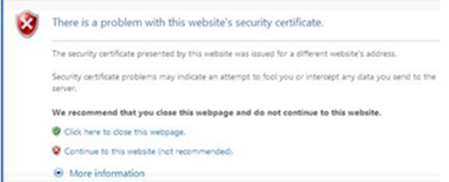
You can safely log in to BEA Macau Online by entering the BEA Macau website URL, www.hkbea.com.mo, into your browser, or bookmark this authentic website for subsequent access. Never use website addresses or links attached in any email or found through Internet search engines to log in to BEA Macau Online.
BEA Macau Online provides the following security measures to safeguard your use of the service:
1. Personal Identification Number ("PIN")
You can log in to BEA Macau Online by using your BEA Macau Online account number and PIN.
2. Last login time
You can view your last login time after successfully logging in to BEA Macau Online.
3. Transport Layer Security ("TLS") with at least 128-bit encryption
"TLS" is an international and well-proven standard encryption module developed to ensure confidentiality during date transmission. All important information transmitted between your browser and our Bank through BEA Macau Online will be encrypted by using at least 128-bit TLS.
Before using BEA Macau Online, you should click "Security Tips" at the bottom of the home page and read the precautions .
To safeguard your account information, you are advised to close all your browsers instantly after logging out of BEA Macau Online to clear the browser memory cache.
Please note that the BEA Group currently maintains the following websites only:
Remarks: Customers will never be asked for any personal information by email, e.g. name, account number, password, etc. To securely view or use the websites of the BEA Group, please input the URL into the address field onscreen or simply access our homepage at www.hkbea.com.mo and never access a URL by clicking on hyperlinks attached to any email. For further information, please call Online Banking Customer Service Hotline on +853 8598 3688.
You should use a browser that BEA Macau Online can support (see FAQ Q4.1). In addition, Java, JavaScript, TSL, and cookies options must be enabled in the browser.
If you want to upgrade your browser version, you may go to the corresponding download sites. Alternatively, you may choose the browser you wish to upgrade in the error page when you enter our webpage once you log in to BEA Macau Online. After making your selection, you will be redirected to the appropriate site for downloading.
To enable TLS version 1.2 in Internet Explorer 8.0, please follow the steps as follow:
For Internet Explorer 8.0*:
Click "Tools"
(* Please refer to the HELP contents of your browser for other versions.)
Some of the latest browser versions have features such as AutoComplete in Internet Explorer, which can save previous entries you have made for web addresses, forms, passwords, etc. Therefore, when you type similar information in one of these fields, a dropdown list with possible matches will automatically appear from which you can select.
To protect yourself and to prevent unauthorised use of your account, you are advised to disable this kind of feature in your browser. You may also lock your personal computer by using power-on passwords etc. to prevent unauthorised access.
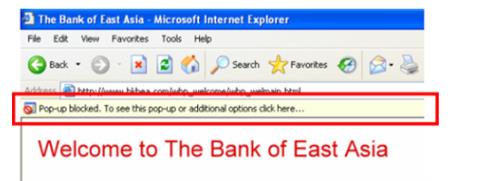
This message appears when the pop-up blocker function of your IE browser has been activated and the filter level is set to [High: Block all pop-ups [Ctrl to override]].
As BEA Macau Online needs the pop-up function in order to display the login menu, you should select one of the following option to adjust the browser setting in order to access BEA Macau Online service.
A. Reset the filter level to "medium".
B. Accept BEA Macau Online as a website with pop-up function.
C. Accept BEA Macau Online as an exceptional website for the pop-up blocker.
Option A: Set the filter level of the pop-up blocker to [Medium: Block most automatic pop-ups]
1. Open IE browser
2. Under the Tools menu, select Pop-up Blocker, and then click "Pop-up Blocker Setting"
3. Select "Medium: Block most automatic pop-ups" in the box near the bottom of the dialog box. 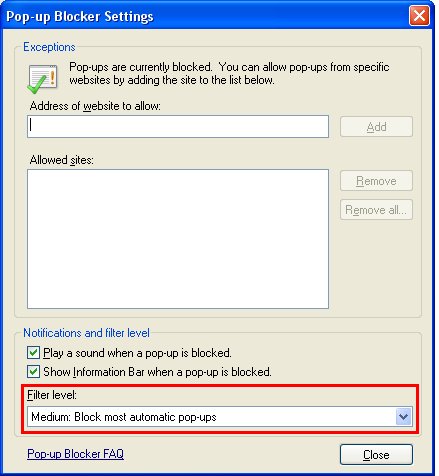
Option B: Accept BEA Macau Online as a website with pop-up function.
Step 1. Select the pop-up blocker bar when it appears, and then click "Always allow the pop-up from this site..." in the pop-up menu.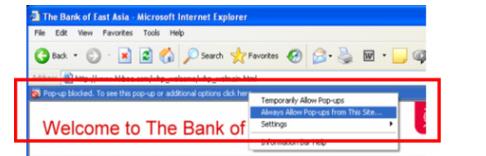
Step 2: Click "Yes" in the confirmation window to complete the setting.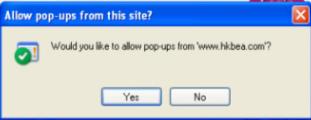
Please visit BEA Macau Branch or call Online Banking Service Hotline on +853 8598 3688. For phone number and address of BEA Macau Branch, please visit Contact Details page.

